Claude Canvas: Transforming the Terminal into a High-Performance GUI for AI Agents

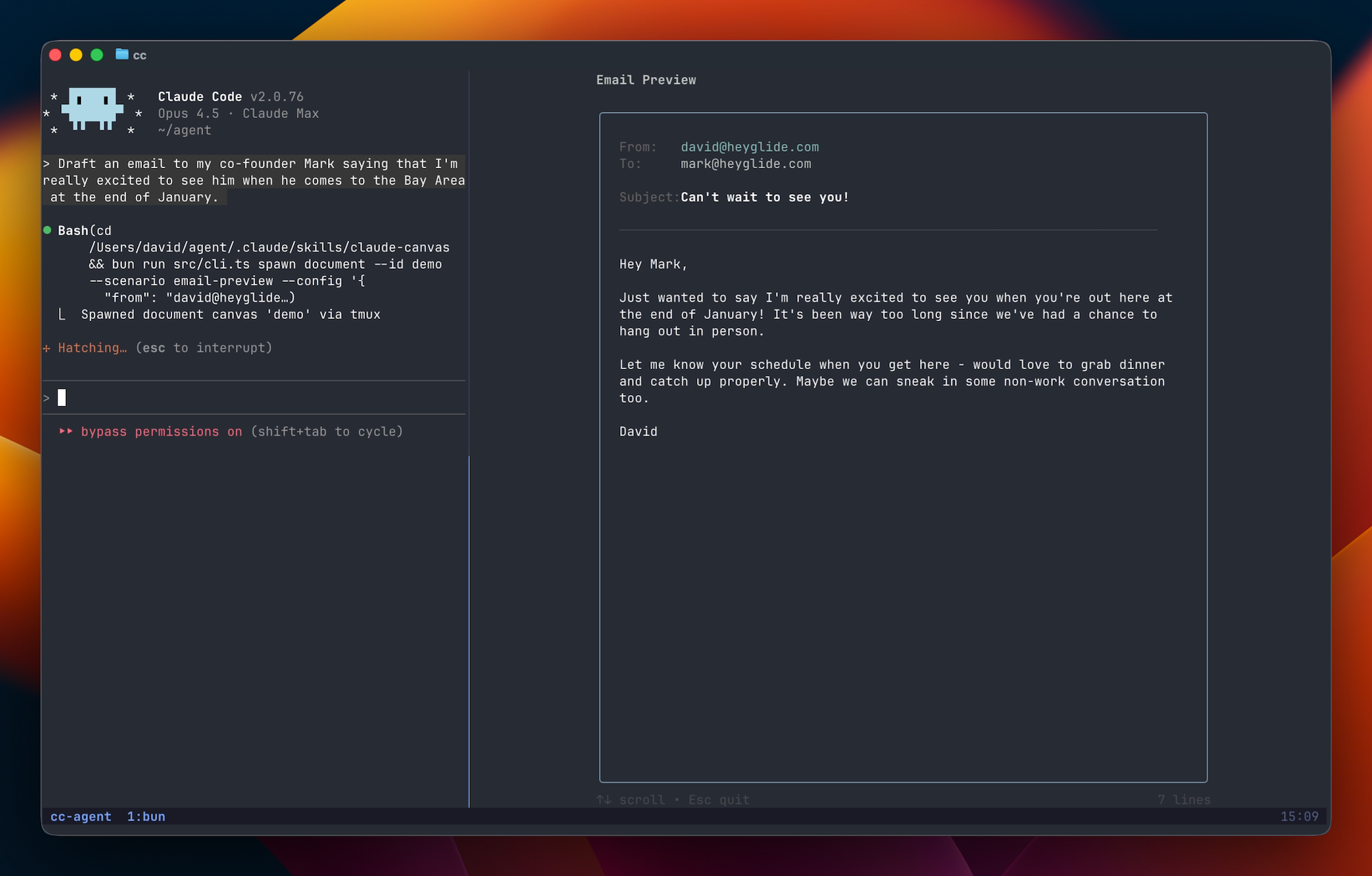
While Claude Code has already established itself as a premier AI coding agent for the terminal, the text-based nature of CLI interactions can sometimes hit a "density ceiling." When you're managing complex calendar overlaps, comparing multiple flight itineraries, or drafting multi-field emails, a standard chat stream feels restrictive.
Enter Claude Canvas: a TUI (Terminal User Interface) toolkit that functions as a dedicated external monitor for your AI agent. Rather than just spitting out text, Claude Code can now spawn rich, interactive terminal displays to visualize data and streamline workflows.
The Evolution of the AI Agent Interface
The current trend in AI development is moving away from simple "chat boxes" toward persistent execution models. Claude Canvas leverages this by allowing Claude to draw interactive interfaces directly within your terminal session.
By using split-panes (via tmux) or native window APIs on macOS, Claude Canvas gives your agent a way to "show" its work. This isn't just about aesthetics; it’s about increasing the bandwidth of information between the human and the AI.
Core Capabilities of Claude Canvas
1. Structured Email Composition
Drafting emails in a chat thread is messy. Claude Canvas creates a dedicated panel with explicit fields for From, To, CC, BCC, and Subject. As you iterate on the message with Claude, the Canvas updates in real-time, allowing you to visualize the final output without scrolling through a long conversation history.
2. Interactive Calendar Visualization
When asking an AI to find mutual availability, the resulting list of dates and times can be difficult to parse. Claude Canvas renders a visual calendar within the terminal. You can use keyboard shortcuts or mouse clicks to select slots, which then communicates the selection back to Claude to finalize the booking.
3. Compact Travel & Data Management
For use cases like flight booking, Claude Canvas provides a seat map and comparison tables. It aggregates flight details into a compact, structured view that is far superior to the walls of text typically generated by LLMs.
Technical Setup and Requirements
To get Claude Canvas running, you need a specific environment tailored for TUI rendering.
Prerequisites
- Claude Code: You must have the official Claude Code CLI installed and linked to a billing account.
- Bun: The fast JavaScript runtime is required to execute the skills and tools.
- Tmux: For Windows and Linux users,
tmuxis essential as it allows Claude Canvas to spawn split-panes dynamically.
Installation Steps
Open Claude Code:
claude
Add this repository as a marketplace in Claude Code:
/plugin marketplace add dvdsgl/claude-canvasThen install the canvas plugin:
/plugin install canvas@claude-canvasThe macOS Alternative: Native Terminal Integration
For users on macOS, there is a specialized fork of Claude Canvas that bypasses tmux in favor of native iTerm2 and Apple Terminal APIs.
- Pros: Smoother UX, auto-positioning of windows, and a more "native" feel.
- Cons: Lacks portability (won't work on Linux/Windows) and cannot be used via remote SSH sessions as easily as the
tmuxversion.
Optimized Workflows: Why This Matters for Developers
The terminal is a high-productivity environment because it minimizes context switching. By adding a "Canvas" layer, you no longer need to leave your terminal to check your calendar or verify an email draft.
This two-way communication—where the TUI sends data back to the LLM based on your interactions—marks the beginning of Autonomous Spec-Driven Agents. You provide the goal, and the agent provides the interface to refine it.
Source : https://github.com/dvdsgl/claude-canvas
📎 Related reading: Mastering Claude Code for Multi-Phase Development: A Practical Guide · Supercharge Your Coding with Claude AI: Advanced Workflows for Developers in 2026 · Beyond Autocomplete: Building Complex Apps Autonomously with the Ralph Wiggum Claude Code Plugin · opencode vs Claude Code: Which AI Coding Agent Should You Use in 2026?